3 min read
9 YouTube thumbnail ideas that keep working, with examples
Stuck on your next thumbnail? Here are nine thumbnail ideas that show up again and again in videos that beat their channel, each with real examples.
You do not need a new idea for every thumbnail. Most thumbnails that work are one of a small number of formats, used well. These nine come up again and again in the Thumbsy Vault, a library of thumbnails whose videos beat their channel’s usual views. The examples under each one are real.
1. The before and after
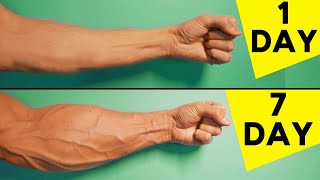
Two states of the same thing, side by side. A room, a body, a bank balance, a car. The viewer sees the change and clicks to see how it happened. 9% of the thumbnails in the Vault use it. Hide part of the “after” if you want even more curiosity.
- 5 Best Exercises For Forearms | Home Workout
@TonySolo · 13M views
- 3 Best Exercises For Forearms | Home
@TonySolo · 7.3M views
- I Spent One Year Farming from Scratch
@spencerhilbert · 8.7M views


2. The comparison
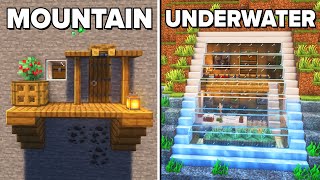
Two different things, split down the middle: cheap against expensive, old against new, one product against its rival. Label each side with one word or a price. It works for reviews, tests and “which is better” videos.
- Replit: Make an app for that
@replit · 306M views
- Minecraft: 3 SIMPLE Starter Houses!
@LombyMC · 30M views
- I tried 500 years of Haircuts
@morgandonner · 8.8M views


3. The arrow or circle
Point at the one detail that matters. An arrow or a circle tells the eye where to go, and makes people ask what is special about that spot. 19% of the Vault’s thumbnails have an arrow. Use one. Three arrows point at nothing.
- We're Not Ready for Biocomputing
@clarifiedmind · 11M views
- Why are TV Cameras still HUGE and expensive ?
@zebrazone · 15M views
- How I Learned to Code in 4 Months & Got a Job! (No CS Degree, No Bootcamp)
@timkimdotcom · 9.4M views


4. The big number
A price, a count, a time, a score. “$1 vs $100,000”, “100 days”, “0 to 1M”. A number is fast to read and sets up a promise the video has to keep. Make the number the largest thing in the frame.
- Beginners Guide to Dropshipping in 2026 (18+ Hours)
@JordanBown · 5.2M views
- I'm 40. If You're In Your 20's or 30's, Watch This
@simonalexandero · 4.3M views
- This Video Will Save You 9+ Years Of Your Life In 6 Minutes
@MaxwellRhoe · 4M views



5. The close-up
Fill the frame with a face or an object. At phone size, a close-up is the only crop where an expression or a texture is still readable. If your current thumbnail feels weak, cropping in is the cheapest fix there is.
- $1 vs $1000 Rubik's Cubes!
@Tingman · 14M views
- why you understand English but CAN'T speak fluently
@ruriohama · 6.7M views
- World's Easiest Chocolate Cake
@patrickzeinali · 4M views


6. The one object on a clean background
No scene and no clutter, just the thing. A phone, a plate of food, a logo. Minimal thumbnails stand out because the thumbnails around them are busy. This is the format for product videos and calm, expert channels.
- How to edit SO good your viewers get addicted to your videos
@LearnByLeo · 5.9M views
- The Entire History of Call of Duty, I guess
@paprika_gaming · 4.2M views
- 5 Most Anti Aging Exercises
@bigmuscles · 2.9M views



7. The thing with no face
Not every thumbnail needs a person. 49% of the thumbnails in the Vault have none. When the subject is a game, a machine, a place or a result, let it take the whole frame. See the numbers in do faces in thumbnails get more views?.
- Printer Ink, It's a SCAM
@FStoppers · 10M views
- I Forced Myself To Get Addicted To Vape
@BodieNeme · 9M views
- the ASIAN SECRET to STUDYING EFFECTIVELY
@jspark8 · 4M views



8. The picture with no words
21% of the Vault’s thumbnails have no text at all. If the picture already raises the question, words only slow it down. Let the title do the talking. This suits travel, food, nature and anything where the image is the reward.
- 35 MOMENTS OF PERFECT TIMING!
@ReactionMatters · 15M views
- Max Verstappen Learns How to Drift | Feat Mad Mike
@RedBullMotorsports · 8.9M views
- How I Would Learn To Code (If I Could Start Over)
@namanhkapur · 7M views


9. The dark background
A dark, simple background with one bright subject. It looks serious, it makes colours glow, and it stands out on YouTube’s white page. Documentary, finance and tech channels use it constantly.
- Why you can't understand English movies.
@englishattheready · 1.2M views
- The Secret Behind Questions That Make People Get Close In 45min
@savagesocialskills · 887K views
- 3 MOST Anti Aging Exercises
@Fitness2X · 571K views


How to choose one
Start from your video, not from the list. Ask what the viewer most wants to see: a change (before and after), a verdict (comparison), a detail (arrow), a scale (number) or a thing (close-up or minimal). Then look at which formats are winning in your niche in the thumbnail makers. When you find one you like, you can make your own version of it there. To learn the craft, read how to make a YouTube thumbnail.