
Productivity thumbnail maker
Productivity thumbnails do well with systems people can copy. A clean desk, an app or a simple diagram signals that the video is practical.
Part of Thumbsy Pro, $10 a month for about 16 thumbnails.
Productivity thumbnails that beat their channel
The strongest of 418 productivity thumbnails in the Vault. The badge is how many times its channel’s usual views each video got. Pick one and make your own version.
- How to Learn So Fast People Assume You're Naturally Gifted
@JustinSung · 5.8M views
- the ASIAN SECRET to STUDYING EFFECTIVELY
@jspark8 · 4M views
- This Video Will Save You 9+ Years Of Your Life In 6 Minutes
@MaxwellRhoe · 4M views
- "Dopamine Loading" is the EASIEST way to get ADDICTED to studying
@MatthewSmith33 · 3.4M views
- The Morning Routine That Sets Up Your Entire Day | Andrew Huberman | Raj Shamani Clips
@rajshamaniclips · 3M views
- how to take pretty notes for lazy people
@ImJem · 2.4M views
- The Art of Becoming Dangerously Self-Educated
@your.nextcore · 2M views
- The Problem With Hourly Pay
@StickHeadDan · 1.6M views
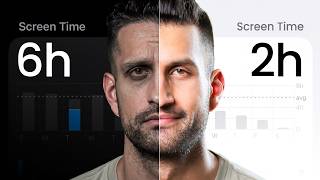
- Phone Addict? (Start this tonight)
@Sahil_Bloom · 1.4M views
- Before You Build a Feature, Do This First (It Will Save You Hours)
@Developete · 1.7M views
- How to (actually) shift your identity (to Succeed) | Psycho-Cybernetics by Maxwell Maltz
@DanZakaria · 1.1M views
- Claude COWORK Clearly Explained (& how to use it for beginners)
@princeeliot · 982K views






What works in productivity thumbnails
Of the 418 productivity thumbnails in the Thumbsy Vault, 63% show a person and 81% have words on them. The colours that come up most are white, black and red. The feeling they go for most is curiosity.
How to make a productivity thumbnail with AI
Productivity thumbnails: FAQs
More self improvement thumbnail makers
Making something else? Try the thumbnail maker for Motivation and Habits, go back to the self improvement thumbnail maker, or browse every thumbnail maker.